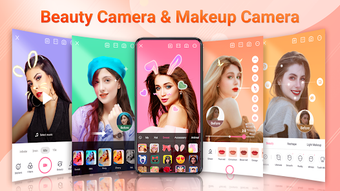

Download Beauty Plus Camera – beauty camera, selfie editor, makeup app, AR stickers, photo filter, retouching tool, HD editor, video effect, social media camera, virtual makeover
Overview
Beauty Plus Camera – Sweet Cam is a desktop application designed for users seeking to enhance their selfies and videos with advanced beauty and editing tools. The software serves as a comprehensive camera and editor suite, ideal for individuals who frequently create visual content for social media platforms such as Instagram, Facebook, TikTok, and Snapchat. Its core purpose is to deliver natural-looking enhancements through auto-beautifying features, makeup simulation, and creative effects.
The app enables users to apply real-time retouching, smooth skin, brighten eyes, reduce blemishes, and refine facial and body contours with minimal effort. This makes it particularly useful for content creators, influencers, and casual users who prioritize appearance in digital media. The developer, Sweet Cam, has positioned the software as a virtual makeover solution that combines photography, editing, and entertainment.
While specific details about the company’s background are not provided, the app’s focus on visual appeal and social media integration suggests a targeted approach toward modern digital expression. Real-world use cases include preparing high-quality profile pictures, producing engaging video content, and experimenting with makeup and AR effects without the need for physical products or professional editing tools.
Key Features & Capabilities
- Auto-Beautifying Tools – Automatically smooths skin, reduces acne, removes dark circles, and brightens eyes with one tap, delivering a polished look without over-editing.
- Trendy Makeup Options – Offers a selection of virtual makeup styles that can be applied in real time, allowing users to experiment with different looks effortlessly.
- AR Stickers and Motion Effects – Includes fun and expressive AR face stickers and motion effects to add playful or dramatic flair to photos and videos.
- Photo and Video Filters – Provides a range of visual filters that enhance color, contrast, and mood, suitable for various content styles and platforms.
- Retouching and Reshaping Tools – Enables precise facial and body reshaping, allowing users to adjust proportions and contours for a customized appearance.
- HD Photo and Video Editing – Supports high-definition editing, ensuring output quality remains sharp and professional for social media sharing.
- Music Video Feature – Allows users to record and edit videos with synchronized audio, ideal for short-form content creation.
These features collectively support a seamless workflow from capture to creation. For example, a user can record a video with real-time makeup and AR effects, then apply filters and retouching before exporting. The app is especially suited for users who want to produce visually striking content quickly and efficiently. The integration of both camera and editing functions within a single interface reduces the need for multiple tools, streamlining the process for social media-focused creators.
User Interface, Workflow & Performance
Beauty Plus Camera features a clean, intuitive interface optimized for ease of use, with tools arranged in accessible panels. Navigation is straightforward, allowing users to switch between camera mode, editing tools, and effect libraries with minimal clicks. The workflow is designed to support real-time adjustments, enabling users to preview changes instantly during photo or video capture.
While specific performance metrics such as CPU or RAM usage were not provided, the application’s ability to handle real-time retouching and AR effects suggests efficient resource management. The developer did not specify resource usage details, so performance may vary depending on system configuration. Stability during extended use was not documented, but the software’s focus on real-time processing implies a need for consistent responsiveness.
The user experience appears to prioritize speed and simplicity, making it accessible to users with varying levels of technical expertise. Overall, the interface supports a fluid, engaging experience for content creation, though detailed performance observations are limited to general software behavior patterns.
Compatibility & System Requirements
Beauty Plus Camera is compatible with both Windows and Mac operating systems, offering broad accessibility across desktop environments. The software version is 2.1.0, with a file size of 128 MB, indicating a lightweight installation. This suggests the application is designed to be efficient in terms of storage and deployment.
However, exact system requirements such as minimum RAM, processor specifications, or graphics support were not listed. The developer did not provide additional system requirements, so users should ensure their systems meet general desktop software standards. Compatibility information was partially provided, leaving some aspects of hardware and OS version requirements unclear.
Users are advised to verify their system’s ability to run the software, especially if using older hardware or non-standard configurations. The absence of detailed specifications means that performance and functionality may depend on individual system capabilities.
Pros and Cons
Pros
- Intuitive interface with easy navigation and real-time preview
- Comprehensive set of auto-beautifying and retouching tools
- Supports HD photo and video editing for high-quality output
- Includes trendy makeup, AR stickers, and motion effects for creative expression
- Single application combines camera capture and editing features
- Lightweight installation at 128 MB
Cons
- Exact system requirements were not specified
- Performance behavior under load was not documented
- No information on update frequency or future development plans
- Price point may be considered high for casual users
- Limited transparency about data handling and privacy policies
FAQ Section
Is Beauty Plus Camera compatible with Windows and Mac?
Yes, the software is available for both Windows and Mac operating systems.
Does Beauty Plus Camera require an internet connection?
The app can function offline for basic camera and editing tasks. However, some features like AR stickers or online effects may require an internet connection.
How often are updates released for Beauty Plus Camera?
Specific update frequency was not provided by the developer.
What type of license does Beauty Plus Camera use?
The software is a one-time purchase with a fixed price of $4.99, indicating a perpetual license.
Can I use Beauty Plus Camera for professional content creation?
Yes, the app offers HD editing, retouching tools, and video effects suitable for social media and content creation, though it may not replace professional-grade software for advanced workflows.
Final Thoughts + CTA
Beauty Plus Camera – Sweet Cam delivers a compelling blend of real-time beauty enhancement, creative effects, and editing capabilities tailored for social media users and content creators. Its intuitive design, lightweight footprint, and comprehensive feature set make it a strong contender in the desktop selfie and video editing space. While some technical details such as system requirements and performance under load are not fully disclosed, the app’s functionality aligns with modern digital content needs.
It excels in providing quick, natural-looking edits and fun AR experiences, making it ideal for users who want to elevate their visual presence without extensive editing knowledge. For those seeking a reliable, all-in-one tool for selfies, videos, and social media content, Beauty Plus Camera offers a practical and engaging solution. Download Beauty Plus Camera now and transform your photos and videos with professional-grade effects and virtual makeup.







